Als je regelmatig in Entra ID (voorheen Azure AD) werkt, ken je het probleem: applicaties staan overal. App registrations hier, enterprise applications daar… en als iemand vraagt “welke rechten heeft deze app eigenlijk?”, begint het klikken.
Veel klikken.
Te veel klikken.
Dus laten we dat gewoon niet meer doen.
Van handwerk naar één export
In veel omgevingen groeit het aantal applicaties sneller dan je denkt. Integraties, API-koppelingen, SaaS-apps, interne tooling… en voor je het weet heb je geen compleet overzicht meer.
De vragen die je blijft krijgen:
- Welke applicaties hebben API-permissies — en welke precies?
- Waar worden secrets en certificaten gebruikt?
- Welke apps hebben (te) brede rechten?
- Wie is eigenaar van deze applicatie?
- Welke redirect URL’s staan er ingesteld?
Het antwoord zit er wel. Alleen niet op één plek.
Tot nu.
Wat dit script voor je doet
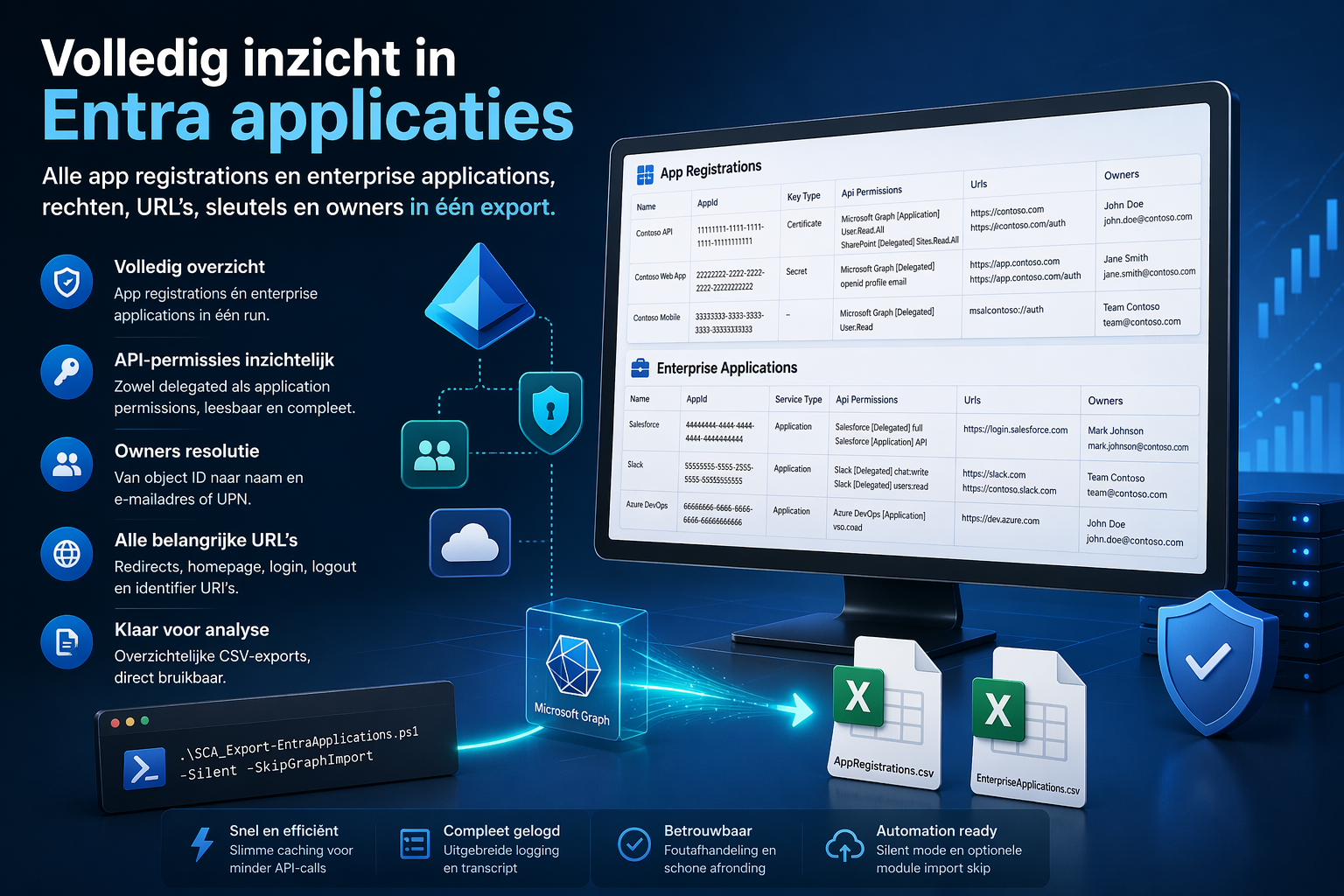
Het PowerShell-script SCA_Export-EntraApplications.ps1 haalt in één run alles op wat je wilt weten en zet dat om naar twee overzichtelijke exports:
- App registrations
- Enterprise applications
Inclusief de details die er echt toe doen:
- Naam en ID’s
- Key credentials (certificaten / secrets)
- API-permissies (delegated + application)
- URL’s (redirects, login, logout, etc.)
- Owners (inclusief naam en e-mailadres)
Alles netjes in CSV. Direct bruikbaar.
Waarom dit wél werkt
🔍 API-permissies die leesbaar zijn
Geen GUID’s, maar gewoon:
- Microsoft Graph [Application] User.Read.All
- SharePoint [Delegated] Sites.Read.All
👤 Owners die kloppen
Geen object ID’s, maar echte namen met e-mail of UPN.
🔐 Key credentials inzichtelijk
Direct zichtbaar welke keys actief zijn en hoe ze gebruikt worden.
⚡ Performance zonder gedoe
Slimme caching voorkomt onnodige Graph-calls.
Gebruik
De basis:
.\SCA_Export-EntraApplications.ps1
Silent mode:
.\SCA_Export-EntraApplications.ps1 -Silent
Graph import overslaan:
.\SCA_Export-EntraApplications.ps1 -SkipGraphImport
Alles combineren:
.\SCA_Export-EntraApplications.ps1 -Silent -SkipGraphImport
Output
De bestanden worden hier geplaatst:
C:\Temp\EntraAppExport\
Met:
- AppRegistrations.csv
- EnterpriseApplications.csv
Logging:
C:\Log\
Het script
Voor wie ’m direct wil gebruiken of aanpassen:
param (
    [switch]$Silent,
    [switch]$SkipGraphImport
)

<#
    .NOTES
    ===========================================================================
     Created on:    2026-04-21
     Created by:    Vincent van Unen
     Filename:      SCA_Export-EntraApplications.ps1
    ===========================================================================
    .DESCRIPTION
     Exporteert alle App Registrations en Enterprise Applications uit een tenant
     met daarbij de velden naam, key type, API-permissions, URL's en owners.
    .SYNOPSIS
        Exporteert alle App Registrations en Enterprise Applications uit een tenant
        met daarbij de velden naam, key type, API-permissions, URL's en owners.
    .PARAMETER Silent
        Wanneer deze switch is opgegeven, worden er geen statusberichten naar de console geschreven en worden alleen foutmeldingen getoond.
    .PARAMETER SkipGraphImport
        Wanneer deze switch is opgegeven, wordt er niet gecontroleerd op de aanwezigheid van de Microsoft.Graph module en wordt deze ook niet geïmporteerd. Gebruik deze optie als je zeker weet dat de module al geïnstalleerd en geïmporteerd is in de huidige sessie.
    .EXAMPLE
        .\SCA_Export-EntraApplications.ps1
        Exporteert alle App Registrations en Enterprise Applications en toont statusberichten in de console.
    .EXAMPLE
        .\SCA_Export-EntraApplications.ps1 -Silent
        Exporteert alle App Registrations en Enterprise Applications zonder statusberichten in de console, alleen foutmeldingen worden getoond.
    .EXAMPLE
        .\SCA_Export-EntraApplications.ps1 -SkipGraphImport
        Exporteert alle App Registrations en Enterprise Applications zonder te controleren op de Microsoft.Graph module. Gebruik deze optie als je zeker weet dat de module al geïnstalleerd en geïmporteerd is in de huidige sessie.
    .EXAMPLE
        .\SCA_Export-EntraApplications.ps1 -Silent -SkipGraphImport
        Exporteert alle App Registrations en Enterprise Applications zonder statusberichten in de console en zonder te controleren op de Microsoft.Graph module. Gebruik deze optie als je zeker weet dat de module al geïnstalleerd en geïmporteerd is in de huidige sessie.

#>

#region Changelog
#################################################################################
# Version History
$SCA_ScriptAuthor        = "Vincent van Unen"
$SCA_ScriptVersion       = "1.1"
$SCA_ScriptChangeDate    = "2026-04-21"
$SCA_ScriptChangeLog     = "Toegevoegd: optionele skip voor Import-Module Microsoft.Graph"
$SCA_ScriptCurrentUser   = $env:UserName
$SCA_ScriptRunningDevice = $env:COMPUTERNAME
$SCA_GetCurrentDate      = Get-Date -Format "yyyy-MM-dd"
$SCA_LogName             = "SCA_Export-EntraApplications"

try {
    $SCA_GetPublicIP = (Invoke-WebRequest -Uri "http://ifconfig.me/ip" -UseBasicParsing -ErrorAction Stop).Content
}
catch {
    $SCA_GetPublicIP = "Onbekend"
}

try {
    $SCA_GetPrivateIP = (
        Get-NetIPAddress -ErrorAction Stop |
        Where-Object {
            $_.AddressFamily -eq "IPv4" -and
            $_.AddressState -eq "Preferred" -and
            $_.IPAddress -notlike "169.254*"
        } |
        Select-Object -ExpandProperty IPAddress -Unique
    ) -join ", "
}
catch {
    $SCA_GetPrivateIP = "Onbekend"
}

<# Change Log
[1.0]    2026-04-21    -    Eerste versie van exportscript
[1.1]    2026-04-21    -    Parameter toegevoegd om Import-Module Microsoft.Graph over te slaan
#>
#endregion Changelog

#region Base configuration
[Net.ServicePointManager]::SecurityProtocol = [Net.SecurityProtocolType]::Tls12

Set-ExecutionPolicy -ExecutionPolicy Unrestricted -Scope LocalMachine -Force -WarningAction Ignore -ErrorAction Ignore
Set-ExecutionPolicy -ExecutionPolicy Unrestricted -Scope Process -Force -WarningAction Ignore -ErrorAction Ignore
Set-ExecutionPolicy -ExecutionPolicy Unrestricted -Scope CurrentUser -Force -WarningAction Ignore -ErrorAction Ignore

$MaximumFunctionCount = 16384
$MaximumVariableCount = 16384
#endregion Base configuration

#region Folder checks
$SCA_ModuleDirTemp1  = "C:\Temp"
$SCA_ModuleDirTemp2  = "C:\Tmp"
$SCA_ModuleDirLog    = "C:\Log"
$SCA_ModuleDirExport = "C:\Temp\EntraAppExport"

if (!(Test-Path -Path $SCA_ModuleDirTemp1))  { New-Item -ItemType Directory -Path $SCA_ModuleDirTemp1  -Force | Out-Null }
if (!(Test-Path -Path $SCA_ModuleDirTemp2))  { New-Item -ItemType Directory -Path $SCA_ModuleDirTemp2  -Force | Out-Null }
if (!(Test-Path -Path $SCA_ModuleDirLog))    { New-Item -ItemType Directory -Path $SCA_ModuleDirLog    -Force | Out-Null }
if (!(Test-Path -Path $SCA_ModuleDirExport)) { New-Item -ItemType Directory -Path $SCA_ModuleDirExport -Force | Out-Null }

Clear-Host
#endregion Folder checks

#region Functions
function SCA_WriteToLogFile {
    [CmdletBinding()]
    param(
        [Parameter(Mandatory = $false)]
        [ValidateSet("INFO", "WARN", "ERROR", "FATAL", "DEBUG")]
        [string]$Level = "INFO",

        [Parameter(Mandatory = $true)]
        [string]$Message,

        [Parameter(Mandatory = $false)]
        [string]$LogFile = "$SCA_ModuleDirLog\$SCA_LogName $SCA_GetCurrentDate.log"
    )

    if ($Message -eq " ") {
        Add-Content -Path $LogFile -Value " " -ErrorAction SilentlyContinue
    }
    else {
        $SCA_Date = (Get-Date).ToUniversalTime().ToString('yyyy-MM-dd HH:mm:ss.fff')
        Add-Content -Path $LogFile -Value "[$SCA_Date] [$Level] $Message" -ErrorAction SilentlyContinue
    }

    if (-not $Silent) {
        Write-Host "[$Level] $Message"
    }
}

function SCA_JoinSafe {
    param(
        [object[]]$Values,
        [string]$Separator = " | "
    )

    if (-not $Values) { return $null }

    $SCA_FilteredValues = $Values | Where-Object { $_ -ne $null -and $_ -ne "" }
    if (-not $SCA_FilteredValues) { return $null }

    return ($SCA_FilteredValues -join $Separator)
}

function SCA_GetOwnerDisplay {
    param(
        [ValidateSet("Application", "ServicePrincipal")]
        [string]$Type,
        [string]$Id
    )

    try {
        if ($Type -eq "Application") {
            $SCA_Owners = Get-MgApplicationOwner -ApplicationId $Id -All -ErrorAction Stop
        }
        else {
            $SCA_Owners = Get-MgServicePrincipalOwner -ServicePrincipalId $Id -All -ErrorAction Stop
        }

        $SCA_ResolvedOwners = foreach ($SCA_Owner in $SCA_Owners) {
            if ($SCA_Owner.AdditionalProperties.displayName) {
                $SCA_Mail = $SCA_Owner.AdditionalProperties.mail
                $SCA_UPN  = $SCA_Owner.AdditionalProperties.userPrincipalName

                if ($SCA_Mail) {
                    "$($SCA_Owner.AdditionalProperties.displayName) <$SCA_Mail>"
                }
                elseif ($SCA_UPN) {
                    "$($SCA_Owner.AdditionalProperties.displayName) <$SCA_UPN>"
                }
                else {
                    $SCA_Owner.AdditionalProperties.displayName
                }
            }
            elseif ($SCA_Owner.Id) {
                $SCA_Owner.Id
            }
        }

        return (SCA_JoinSafe -Values $SCA_ResolvedOwners)
    }
    catch {
        return "ERROR: $($_.Exception.Message)"
    }
}

function SCA_GetKeyTypes {
    param(
        [object[]]$KeyCredentials
    )

    if (-not $KeyCredentials) { return $null }

    $SCA_KeyItems = foreach ($SCA_Key in $KeyCredentials) {
        $SCA_Usage = $SCA_Key.Usage
        $SCA_Type  = $SCA_Key.Type
        $SCA_Name  = $SCA_Key.DisplayName

        @(
            if ($SCA_Name)  { $SCA_Name }
            if ($SCA_Usage) { "usage=$SCA_Usage" }
            if ($SCA_Type)  { "type=$SCA_Type" }
        ) -join "; "
    }

    return (SCA_JoinSafe -Values $SCA_KeyItems)
}

$script:SCA_ServicePrincipalCache = @{}

function SCA_GetResourceSpByAppId {
    param(
        [string]$AppId
    )

    if ([string]::IsNullOrWhiteSpace($AppId)) { return $null }

    if (-not $script:SCA_ServicePrincipalCache.ContainsKey($AppId)) {
        $SCA_ServicePrincipal = Get-MgServicePrincipal -Filter "appId eq '$AppId'" -Property "id,appId,displayName,appRoles,oauth2PermissionScopes" -All
        $script:SCA_ServicePrincipalCache[$AppId] = $SCA_ServicePrincipal | Select-Object -First 1
    }

    return $script:SCA_ServicePrincipalCache[$AppId]
}

function SCA_ResolveAppRegistrationPermissions {
    param(
        [object[]]$RequiredResourceAccess
    )

    if (-not $RequiredResourceAccess) { return $null }

    $SCA_Output = foreach ($SCA_RRA in $RequiredResourceAccess) {
        $SCA_ResourceAppId = $SCA_RRA.ResourceAppId
        $SCA_ResourceSp    = SCA_GetResourceSpByAppId -AppId $SCA_ResourceAppId
        $SCA_ResourceName  = if ($SCA_ResourceSp.DisplayName) { $SCA_ResourceSp.DisplayName } else { $SCA_ResourceAppId }

        foreach ($SCA_RA in $SCA_RRA.ResourceAccess) {
            $SCA_PermissionName = $null
            $SCA_PermissionKind = $SCA_RA.Type

            if ($SCA_PermissionKind -eq "Scope" -and $SCA_ResourceSp.Oauth2PermissionScopes) {
                $SCA_Match = $SCA_ResourceSp.Oauth2PermissionScopes | Where-Object { $_.Id -eq $SCA_RA.Id } | Select-Object -First 1
                if ($SCA_Match) { $SCA_PermissionName = $SCA_Match.Value }
            }
            elseif ($SCA_PermissionKind -eq "Role" -and $SCA_ResourceSp.AppRoles) {
                $SCA_Match = $SCA_ResourceSp.AppRoles | Where-Object { $_.Id -eq $SCA_RA.Id } | Select-Object -First 1
                if ($SCA_Match) { $SCA_PermissionName = $SCA_Match.Value }
            }

            if (-not $SCA_PermissionName) {
                $SCA_PermissionName = $SCA_RA.Id
            }

            "$SCA_ResourceName [$SCA_PermissionKind] $SCA_PermissionName"
        }
    }

    return (SCA_JoinSafe -Values $SCA_Output)
}

function SCA_GetSPDelegatedPermissions {
    param(
        [string]$ServicePrincipalId
    )

    try {
        $SCA_Grants = Get-MgServicePrincipalOauth2PermissionGrant -ServicePrincipalId $ServicePrincipalId -All -ErrorAction Stop
        if (-not $SCA_Grants) { return $null }

        $SCA_Result = foreach ($SCA_Grant in $SCA_Grants) {
            $SCA_ResourceSp = $null
            try {
                $SCA_ResourceSp = Get-MgServicePrincipal -ServicePrincipalId $SCA_Grant.ResourceId -Property "displayName"
            }
            catch {
            }

            $SCA_ResourceName = if ($SCA_ResourceSp.DisplayName) { $SCA_ResourceSp.DisplayName } else { $SCA_Grant.ResourceId }
            "$SCA_ResourceName [Delegated] $($SCA_Grant.Scope)"
        }

        return (SCA_JoinSafe -Values $SCA_Result)
    }
    catch {
        return "ERROR: $($_.Exception.Message)"
    }
}

function SCA_GetSPApplicationPermissions {
    param(
        [string]$ServicePrincipalId
    )

    try {
        $SCA_Assignments = Get-MgServicePrincipalAppRoleAssignment -ServicePrincipalId $ServicePrincipalId -All -ErrorAction Stop
        if (-not $SCA_Assignments) { return $null }

        $SCA_Result = foreach ($SCA_Assignment in $SCA_Assignments) {
            $SCA_ResourceSp = $null
            try {
                $SCA_ResourceSp = Get-MgServicePrincipal -ServicePrincipalId $SCA_Assignment.ResourceId -Property "displayName,appRoles"
            }
            catch {
            }

            $SCA_ResourceName = if ($SCA_ResourceSp.DisplayName) { $SCA_ResourceSp.DisplayName } else { $SCA_Assignment.ResourceId }
            $SCA_RoleName     = $SCA_Assignment.AppRoleId

            if ($SCA_ResourceSp.AppRoles) {
                $SCA_Role = $SCA_ResourceSp.AppRoles | Where-Object { $_.Id -eq $SCA_Assignment.AppRoleId } | Select-Object -First 1
                if ($SCA_Role) { $SCA_RoleName = $SCA_Role.Value }
            }

            "$SCA_ResourceName [Application] $SCA_RoleName"
        }

        return (SCA_JoinSafe -Values $SCA_Result)
    }
    catch {
        return "ERROR: $($_.Exception.Message)"
    }
}
#endregion Functions

#region Logging start
SCA_WriteToLogFile -Message "Current Date = $SCA_GetCurrentDate"
SCA_WriteToLogFile -Message "Script Author = $SCA_ScriptAuthor"
SCA_WriteToLogFile -Message "Script Version = $SCA_ScriptVersion"
SCA_WriteToLogFile -Message "Script ChangeDate = $SCA_ScriptChangeDate"
SCA_WriteToLogFile -Message "Current User Running this script = $SCA_ScriptCurrentUser"
SCA_WriteToLogFile -Message "Current Device Running this script = $SCA_ScriptRunningDevice"
SCA_WriteToLogFile -Message "Current Public IP = $SCA_GetPublicIP"
SCA_WriteToLogFile -Message "Current Private IP = $SCA_GetPrivateIP"
SCA_WriteToLogFile -Message "Silent parameter = $Silent"
SCA_WriteToLogFile -Message "SkipGraphImport parameter = $SkipGraphImport"

$SCA_TranscriptFile = "$SCA_ModuleDirLog\$SCA_GetCurrentDate`_$SCA_LogName`_Transcript.log"
Start-Transcript -Path $SCA_TranscriptFile -Force
#endregion Logging start

try {
    #region Module and connection checks
    SCA_WriteToLogFile -Message "Controleren of Microsoft Graph module beschikbaar is"

    if (-not $SkipGraphImport) {
        if (-not (Get-Module -ListAvailable -Name Microsoft.Graph)) {
            SCA_WriteToLogFile -Level "WARN" -Message "Microsoft.Graph module niet gevonden. Installatie wordt gestart"
            Install-Module Microsoft.Graph -Scope CurrentUser -Force -AllowClobber -ErrorAction Stop
        }

        SCA_WriteToLogFile -Message "Importeren van Microsoft.Graph module"
        Import-Module Microsoft.Graph -ErrorAction Stop
        SCA_WriteToLogFile -Message "Microsoft.Graph module geladen"
    }
    else {
        SCA_WriteToLogFile -Message "Module check en import van Microsoft.Graph overgeslagen"
    }

    SCA_WriteToLogFile -Message "Verbinden met Microsoft Graph"
    Connect-MgGraph -Scopes "Application.Read.All", "Directory.Read.All" -NoWelcome -ErrorAction Stop
    if (Get-Command Select-MgProfile -ErrorAction SilentlyContinue) {
        SCA_WriteToLogFile -Message "Select-MgProfile beschikbaar, profiel wordt gezet naar v1.0"
        Select-MgProfile -Name "v1.0" -ErrorAction Stop
    }
    else {
        SCA_WriteToLogFile -Message "Select-MgProfile niet beschikbaar (Graph SDK v2+), stap wordt overgeslagen"
    }
    SCA_WriteToLogFile -Message "Verbonden met Microsoft Graph"
    #endregion Module and connection checks

    #region Export app registrations
    SCA_WriteToLogFile -Message "App registrations ophalen"

    $SCA_AppRegistrations = Get-MgApplication -All -Property `
        "id,appId,displayName,keyCredentials,requiredResourceAccess,identifierUris,web,spa,publicClient"

    $SCA_AppRegistrationExport = foreach ($SCA_App in $SCA_AppRegistrations) {
        $SCA_Urls = @()

        if ($SCA_App.Web) {
            $SCA_Urls += $SCA_App.Web.HomePageUrl
            $SCA_Urls += $SCA_App.Web.RedirectUris
            $SCA_Urls += $SCA_App.Web.LogoutUrl
        }

        if ($SCA_App.Spa) {
            $SCA_Urls += $SCA_App.Spa.RedirectUris
        }

        if ($SCA_App.PublicClient) {
            $SCA_Urls += $SCA_App.PublicClient.RedirectUris
        }

        $SCA_Urls += $SCA_App.IdentifierUris

        [pscustomobject]@{
            ObjectType     = "AppRegistration"
            Name           = $SCA_App.DisplayName
            AppId          = $SCA_App.AppId
            ObjectId       = $SCA_App.Id
            KeyType        = SCA_GetKeyTypes -KeyCredentials $SCA_App.KeyCredentials
            ApiPermissions = SCA_ResolveAppRegistrationPermissions -RequiredResourceAccess $SCA_App.RequiredResourceAccess
            Urls           = SCA_JoinSafe -Values ($SCA_Urls | Select-Object -Unique)
            Owners         = SCA_GetOwnerDisplay -Type "Application" -Id $SCA_App.Id
        }
    }

    $SCA_AppRegistrationsCsv = Join-Path $SCA_ModuleDirExport "AppRegistrations.csv"
    $SCA_AppRegistrationExport | Export-Csv -Path $SCA_AppRegistrationsCsv -NoTypeInformation -Encoding UTF8
    SCA_WriteToLogFile -Message "App registrations geëxporteerd naar $SCA_AppRegistrationsCsv"
    #endregion Export app registrations

    #region Export enterprise applications
    SCA_WriteToLogFile -Message "Enterprise applications ophalen"

    $SCA_ServicePrincipals = Get-MgServicePrincipal -All -Property `
        "id,appId,displayName,servicePrincipalType,keyCredentials,homepage,loginUrl,logoutUrl,replyUrls"

    $SCA_ServicePrincipalExport = foreach ($SCA_SP in $SCA_ServicePrincipals) {
        $SCA_PermDelegated   = SCA_GetSPDelegatedPermissions -ServicePrincipalId $SCA_SP.Id
        $SCA_PermApplication = SCA_GetSPApplicationPermissions -ServicePrincipalId $SCA_SP.Id

        $SCA_AllPermissions = @()
        if ($SCA_PermDelegated)   { $SCA_AllPermissions += $SCA_PermDelegated }
        if ($SCA_PermApplication) { $SCA_AllPermissions += $SCA_PermApplication }

        $SCA_Urls = @(
            $SCA_SP.Homepage
            $SCA_SP.LoginUrl
            $SCA_SP.LogoutUrl
        ) + $SCA_SP.ReplyUrls

        [pscustomobject]@{
            ObjectType     = "EnterpriseApplication"
            Name           = $SCA_SP.DisplayName
            AppId          = $SCA_SP.AppId
            ObjectId       = $SCA_SP.Id
            ServiceType    = $SCA_SP.ServicePrincipalType
            KeyType        = SCA_GetKeyTypes -KeyCredentials $SCA_SP.KeyCredentials
            ApiPermissions = SCA_JoinSafe -Values $SCA_AllPermissions
            Urls           = SCA_JoinSafe -Values ($SCA_Urls | Select-Object -Unique)
            Owners         = SCA_GetOwnerDisplay -Type "ServicePrincipal" -Id $SCA_SP.Id
        }
    }

    $SCA_EnterpriseApplicationsCsv = Join-Path $SCA_ModuleDirExport "EnterpriseApplications.csv"
    $SCA_ServicePrincipalExport | Export-Csv -Path $SCA_EnterpriseApplicationsCsv -NoTypeInformation -Encoding UTF8
    SCA_WriteToLogFile -Message "Enterprise applications geëxporteerd naar $SCA_EnterpriseApplicationsCsv"
    #endregion Export enterprise applications

    #region Summary
    SCA_WriteToLogFile -Message "Export succesvol afgerond"
    SCA_WriteToLogFile -Message "Outputbestand App registrations = $SCA_AppRegistrationsCsv"
    SCA_WriteToLogFile -Message "Outputbestand Enterprise applications = $SCA_EnterpriseApplicationsCsv"

    if (-not $Silent) {
        Write-Host ""
        Write-Host "Klaar met export." -ForegroundColor Green
        Write-Host "Bestanden:"
        Write-Host " - $SCA_AppRegistrationsCsv"
        Write-Host " - $SCA_EnterpriseApplicationsCsv"
    }
    #endregion Summary
}
catch {
    SCA_WriteToLogFile -Level "ERROR" -Message "Er is een fout opgetreden: $($_.Exception.Message)"
    throw
}
finally {
    try {
        Disconnect-MgGraph | Out-Null
        SCA_WriteToLogFile -Message "Verbinding met Microsoft Graph gesloten"
    }
    catch {
        SCA_WriteToLogFile -Level "WARN" -Message "Verbinding met Microsoft Graph kon niet netjes worden afgesloten"
    }

    try {
        Stop-Transcript | Out-Null
    }
    catch {
    }

    try {
        Copy-Item -Path $SCA_TranscriptFile -Destination "C:\ProgramData\Microsoft\IntuneManagementExtension\Logs" -Force -ErrorAction Stop
        SCA_WriteToLogFile -Message "Transcript gekopieerd naar IntuneManagementExtension logs"
    }
    catch {
        SCA_WriteToLogFile -Level "WARN" -Message "Transcript kon niet worden gekopieerd naar IntuneManagementExtension logs"
    }
}
Wanneer gebruik je dit
Dit script is ideaal voor:
🔐 Security & audits
Snel inzicht in permissies en eigenaarschap.
📊 Tenant assessments
Perfect voor onboarding of health checks.
🔄 Lifecycle management
Opschonen van oude of ongebruikte apps.
🧾 Rapportages
Direct bruikbaar in Excel of Power BI.
Conclusie
Als je serieus met Entra ID werkt, wil je overzicht.
Niet verspreid over vijf portals, maar gewoon in één keer goed.
Dit script doet precies dat.